
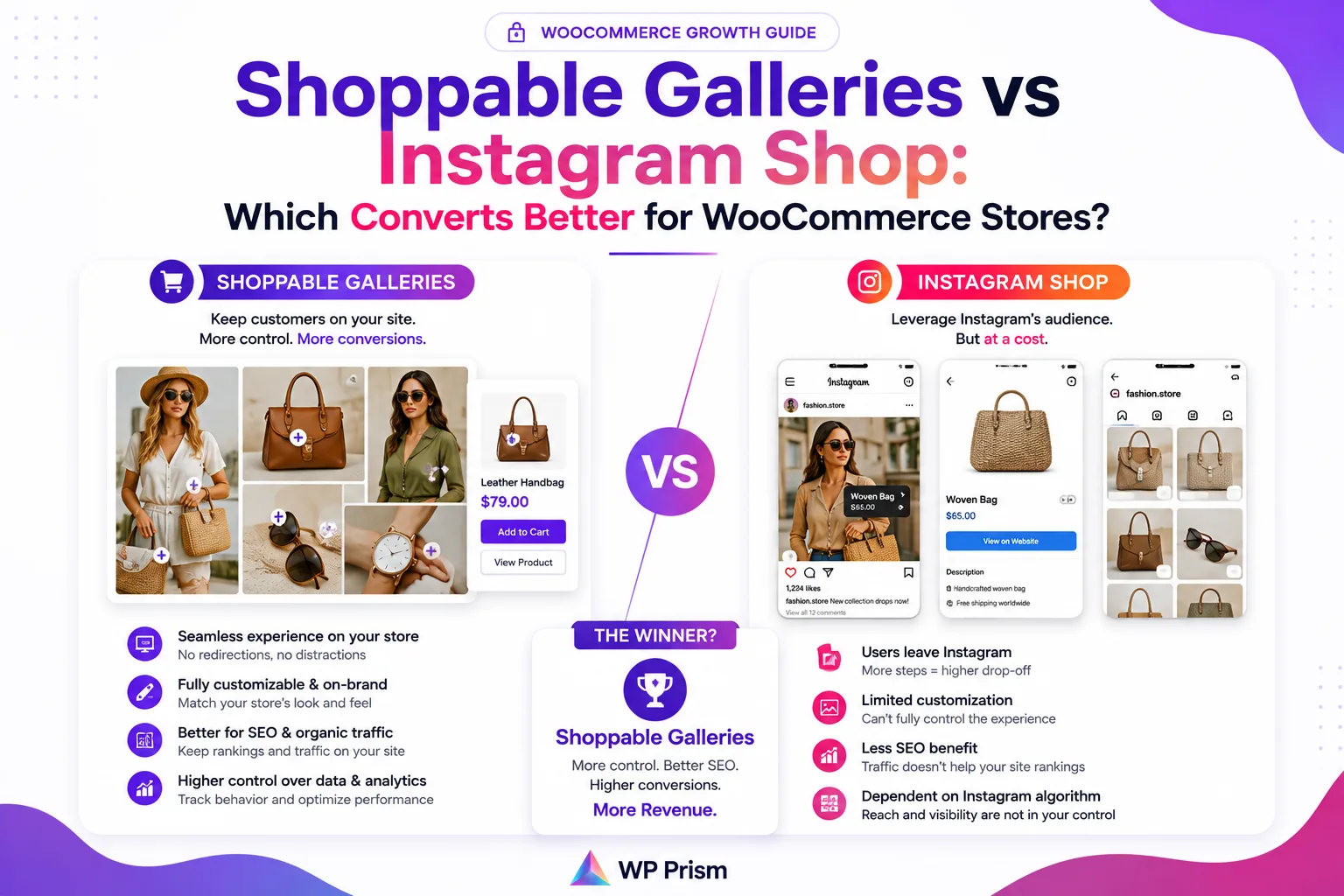
If you sell through WooCommerce and you’re active on Instagram, at some point you’ve looked at Instagram Shop and asked whether it’s worth setting up. The pitch is straightforward: tag products in your posts and reels, and people can buy without leaving Instagram. Simple.
The problem is that “without leaving Instagram” is also the catch. Every sale that happens inside Instagram’s native shopping experience is a sale that Meta owns the data on. You get the revenue, but Meta gets the customer behavior, the browsing session, and the retargeting data. Your WooCommerce store sees the order, but it missed the conversion event.
A shoppable gallery on your own WordPress site does something different. It brings your Instagram content onto your domain, keeps the browsing session on your site, and routes every purchase through your own WooCommerce checkout. Here’s how the two approaches compare when you look past the surface.
How Instagram Shop Works
Instagram Shop is Meta’s native commerce layer built into the Instagram app. You connect a product catalog (either directly or via a platform like Shopify or WooCommerce through a Meta integration), tag products in your posts and reels, and customers can tap through to a product detail page inside Instagram and check out without leaving the app.
For stores that primarily live on Instagram and have a large, engaged following there, this removes friction at the moment of intent. Someone sees a reel, taps the product tag, and buys. The path is short.
The trade offs:
- Meta approval is required. Your account needs to meet Meta’s commerce eligibility requirements, your products need to comply with their commerce policies, and approval can take days or be denied without much explanation.
- You don’t own the checkout. Depending on your region and setup, checkout may happen inside Instagram rather than on your site, which means Meta captures that session data, not you.
- Algorithm dependency. Your shoppable posts’ reach is subject to whatever Instagram’s algorithm decides to show. A change in reach directly impacts your sales channel.
- No email capture at checkout. If a customer buys through Instagram’s native checkout, you may not receive their email address for your own marketing.
How a Shoppable Gallery on WordPress Works
A shoppable gallery, using a plugin like Shoppable Social Feed & Reels, pulls your Instagram posts and reels onto your WordPress site and maps your WooCommerce products to each piece of content.
On the front end, visitors see a grid of your synced Instagram content. Clicking any post opens a scrollable, story style lightbox where the mapped WooCommerce product appears as a card with a direct “Add to WooCommerce Cart” button. The entire experience happens on your domain, through your checkout, and every conversion is tracked in your own analytics and CRM.
The trade offs:
- You drive the traffic. The gallery only converts visitors who are already on your site. It doesn’t surface your content to new audiences the way Instagram’s feed algorithm can.
- Initial setup required. You need to connect your Instagram account, sync your posts, and map products to content. Not complicated, but it’s more setup than tagging a product in the Instagram app.
Conversion Rate: What the Data Actually Suggests
Conversion rates vary too much by store, niche, and audience to quote a single number honestly. But the pattern that holds across most WooCommerce stores is this: visitors who arrive on your site convert at a higher rate than visitors browsing Instagram’s feed.
The reason is intent. Someone on Instagram is in a discovery or entertainment mindset. Someone who has navigated to your site, or been sent there from a campaign, is further along in their consideration. A shoppable gallery captures that higher intent moment on your own domain rather than trying to convert a passive scroller inside Instagram’s app.
Instagram Shop wins on reach and top of funnel discovery, particularly for stores with large followings and content that performs well organically. Shoppable galleries win on conversion rate for the traffic you’ve already earned.
Which One Is Right for Your Store
Choose Instagram Shop if:
- Your primary audience lives on Instagram and rarely visits your website independently
- You’re focused on new customer discovery rather than converting existing site visitors
- Your products are a clean fit for Meta’s commerce policies and you’ve already been approved
- You’re on Shopify or another platform where the Meta catalog sync is already built in
Choose a shoppable gallery on WordPress if:
- You run WooCommerce and want every sale to flow through your own checkout
- You want to own the customer data, email addresses, and purchase history from every transaction
- You’re already driving traffic to your site through SEO, email, or paid ads and want to convert that traffic more effectively
- You don’t want your sales channel to depend on Meta’s approval status or algorithm reach
Use both if:
- You have the bandwidth to manage two setups and want to maximize coverage at every stage. Instagram Shop for discovery and top of funnel reach, shoppable gallery on your site for converting the traffic you’ve already earned.
For most WooCommerce store owners reading this, the shoppable gallery is the stronger long term investment. It builds on your own platform, strengthens your own domain, feeds your own analytics, and every sale stays inside your own customer relationship. Instagram Shop is a useful addition once that foundation is in place, not a replacement for it.
Frequently Asked Questions
Can I use both at the same time? Yes. They’re independent setups. Your Instagram posts can be tagged for Instagram Shop and also synced to a shoppable gallery on your WordPress site simultaneously.
Do I need a large Instagram following for a shoppable gallery to be worth it? No. The gallery converts site visitors, not Instagram followers. If you’re driving any meaningful traffic to your site, a shoppable gallery gives that traffic a more engaging way to browse and buy. Following size is more relevant for Instagram Shop’s discovery reach.
Does the shoppable gallery pull in new posts automatically? Yes. The plugin syncs your Instagram feed on a schedule and pulls in new posts automatically. You then map products to new content as you add it.
What happens to my shoppable gallery if Instagram changes its API? The plugin uses Instagram’s official API. If Meta makes API changes, plugin updates handle compatibility. This is true of any Instagram connected tool including Instagram Shop itself.